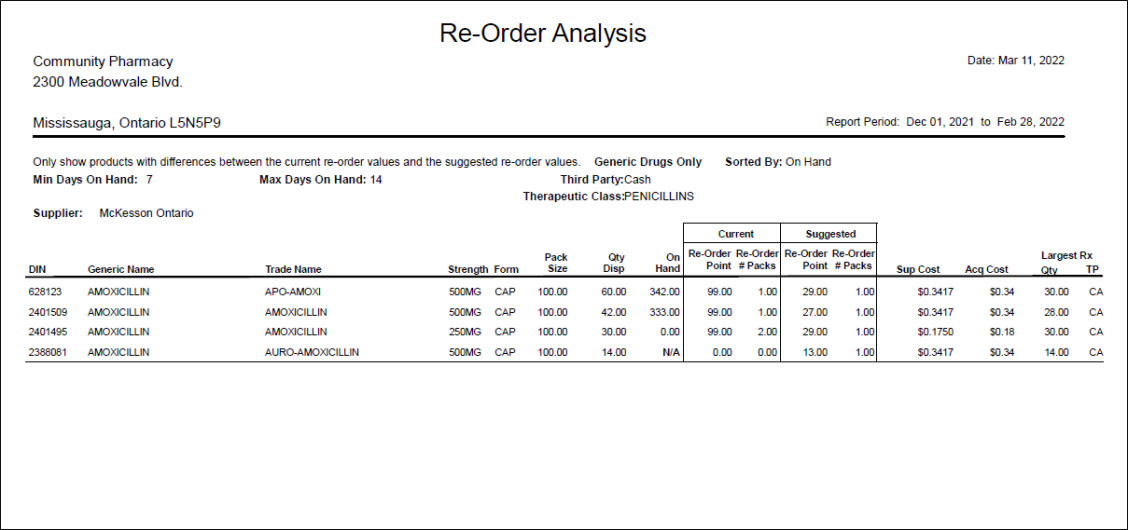
Re-order Analysis Report
The Re-order Analysis report recommends inventory re-order points and re-order quantities based on average daily product usage over a selected time period. The report lists all products dispensed during the time period, regardless of whether or not they are monitored in inventory. The report can be used when starting to monitor inventory or for existing users to re-evaluate re-order parameters.
The report excludes products marked as POS Products in the Drug Folders, since they cannot be reordered from Propel Rx.
 Criteria
Any criteria entered is indicated on the top of the report.
-
Start Date and End Date - generates the report for products dispensed during the specified date range. The default date range is the past 3 calendar months.
-
Drug - generates the report for the specified drug if it was dispensed during the date range. Only one drug can be entered at a time.
-
Manufacturer - generates the report for dispensed drugs from the specified manufacturer.
-
Supplier - generates the report for dispensed drugs from the specified supplier.
-
Inventory # - this criteria is no longer applicable. This field can be left blank.
-
Third Party - generates the report for drugs billed to the specified Third Party.
-
Custom Class - generates the report for dispensed drugs belonging to the specified custom class.
-
Therapeutic Class - generates the report for dispensed drugs belonging to the specified therapeutic class.
-
Report Group - generates the report for the selected report group(s). Only drug-type and mixture-type report groups are available for selection. If more than one is selected, drugs or mixtures that belong to at least one of the report groups and meet the other selected criteria will display on the report.
Extended
-
Min On Hand - the minimum number of days worth of stock that your pharmacy would like to keep on hand. The default value is 7. This number is used to calculate suggested re-order point. This is a required field to generate the report.
-
Max on Hand - the maximum number of days worth of stock that your pharmacy would like to keep on hand. The default value is 10. This number is used to calculate the suggested re-order amount. This is a required field to generate the report.
-
Only show re-order differences - when this option is selected, the report excludes monitored products where both suggested re-order values (point and mount) match the current re-order values. When this option is not selected, all dispensed products are included in the report.
For example, if a monitored product's current and suggested re-order point is 150 and the current and suggested re-order # packs is 1, the product is not included in the report.
-
Generics Only - generates the report for dispensed generic drugs only. The report can be used to review movement of generic stock. When this option is selected, "Generic Drugs Only" appears at the top of the report.
Designation of generic drugs is based on the manufacturer code.
-
Generic Names beginning with the letter - generates the report for drugs with generic names beginning with the specified letter.
This option is useful if your shelves are arranged alphabetically by generic name.
-
Trade Names beginning with the letter - generates the report for drugs with trade names beginning with the specified letter.
-
Manufacturers beginning with the letter - generates the report for drugs with manufacturer codes beginning with the specified letter.
Sort Options
The selected sort option appears at the top of the report.
-
Generic Name - sorts products alphabetically in ascending order by the drug's generic name. This is the default sort option.
-
Acquisition Cost Prompt - sorts products by acquisition cost in descending order. Products with the highest acquisition cost appear at the top of the report and those with no acquisition cost are at the bottom.
-
DIN - sorts products in ascending order by DIN.
-
Manufacturer, Generic Name - sorts products alphabetically in ascending order by manufacturer code. Within each manufacturer, the products are listed alphabetically in ascending order by generic name.
-
On Hand - sorts products in descending order by the on hand amount. Products with the highest on hand are at the top of the report and those that are not monitored are at the bottom.
-
Qty Disp - sorts products in descending order by quantity dispensed. Products with the highest quantity dispensed appear at the top of the report and those with the lowest quantity dispensed are at the bottom.
-
Supplier Cost - sorts products in descending order by supplier cost. Products with the highest supplier cost appear at the top of the report and those with no supplier cost are at the bottom.
-
Trade Name - sorts products alphabetically in ascending order by the drug's trade name.